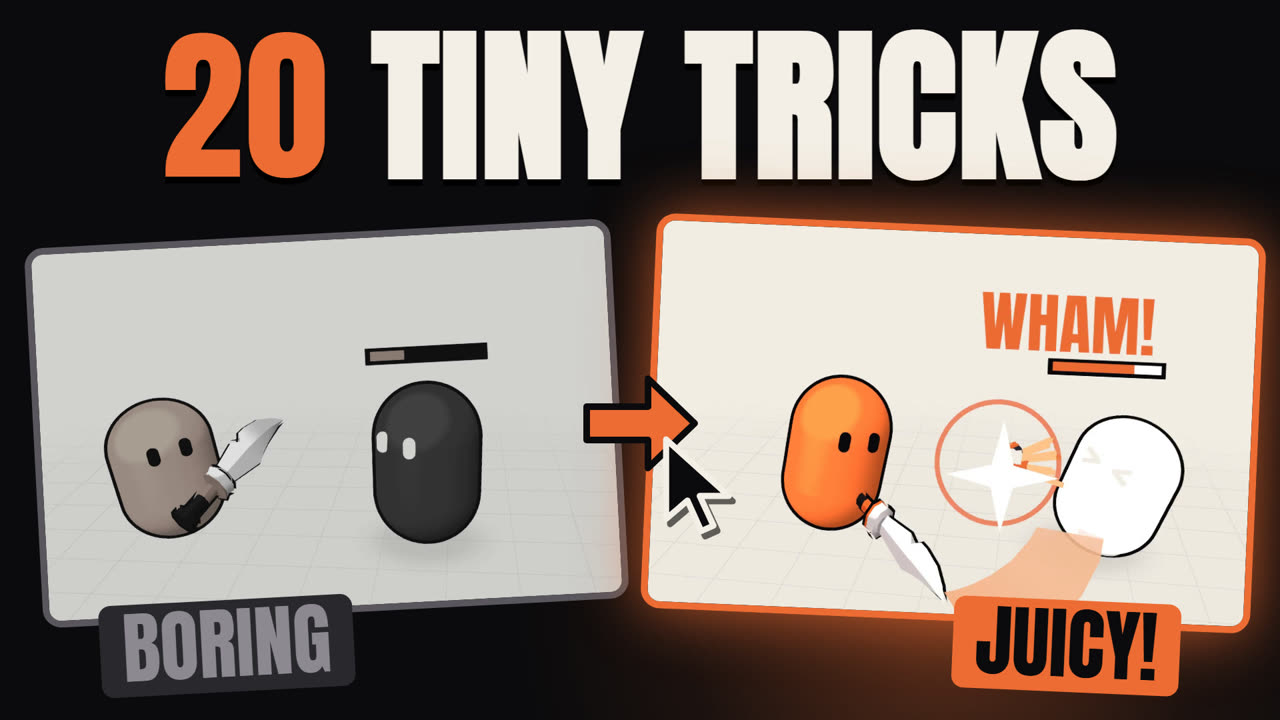
Hit stop freezes both the attacker and the target for a few dozen milliseconds the moment an attack connects. That tiny pause is why a sword strike in a polished game feels like it lands instead of passing through fog.
Why It Works
Your brain interprets a momentary freeze as resistance. When time stops for 70 ms, it reads as: this object had mass, the blow had consequence. Remove the freeze and every attack feels like swinging through air regardless of your animation or particles.
Two things the freeze buys you:
- Perception time. It gives the player's eye a frame to register the contact and the hitflash before motion resumes.
- Input safety. Hit stop freezes the simulation, not the input queue — a press during the freeze is registered normally the moment it ends (swordarcade.xyz).
The Recipe
| Parameter | Starting value | Range | What it changes |
|---|---|---|---|
duration (light) | 0.035 s | 0.02 – 0.05 s | Jab, ranged shot |
duration (heavy) | 0.07 s | 0.05 – 0.10 s | Sword, hammer swing |
duration (critical) | 0.09 s | 0.08 – 0.12 s | Finisher, parry counter |
scale | 0.05 | 0.0 – 0.15 | 0 = hard freeze · 0.1 = heavy slow-mo |
| Hitflash | 2–3 frames | 1 – 5 frames | White/color overlay on the target |
| Vibration | ±3 px horizontal | ±1 – 5 px | Attacker shakes during the freeze |
Never use
scale = 0.0with CharacterBody2D/3D on moving platforms. Godot's physics divides by zero and nodes can teleport. Use0.02as your hard floor.
The Code
Add HitStop.gd as an Autoload (Project → Project Settings → Autoload).
# HitStop.gd — Autoload as "HitStop"
extends Node

## Freeze the game briefly to sell a hit's weight.
## duration : real-time seconds (0.035 light · 0.07 heavy · 0.09 crit)
## scale    : Engine.time_scale during freeze (0.05 = near-stop, 0.1 = slow-mo)
func freeze(duration: float = 0.07, scale: float = 0.05) -> void:
	Engine.time_scale = maxf(scale, 0.02)   # never go below 0.02 (physics safety)

	# CRITICAL: the 4th argument (ignore_time_scale = true) makes the timer run
	# in real time. Without it your 0.07 s freeze lasts ~3.5 s at scale 0.02.
	await get_tree().create_timer(duration, true, false, true).timeout

	Engine.time_scale = 1.0
Call it wherever an attack lands — typically in a hitbox's body_entered signal:
# In your weapon node or hitbox Area2D
func _on_hitbox_body_entered(body: Node2D) -> void:
	if not body.is_in_group("enemy"):
		return

	var is_crit: bool = randf() < crit_chance
	body.take_damage(damage * (2.0 if is_crit else 1.0))

	if is_crit:
		HitStop.freeze(0.09, 0.02)   # critical — near-hard freeze
	else:
		HitStop.freeze(0.07, 0.05)   # normal heavy hit
Tuning Tips & Common Mistakes
Scale by damage, not just hit type. If your heavy sword does 10× more damage than a jab, its freeze should feel 2–3× longer, not identical. Sakurai ties hit stop directly to damage in Smash Bros. — high-damage moves automatically get more freeze (sourcegaming.info, Nov 2015).
Keep projectiles shorter. Bullets and arrows read as fast and light — give them 20–30 ms max, or no freeze at all. A frozen crossbow bolt looks wrong.
Combine, don't replace. Hit stop works best alongside a hitflash (white modulate for 2 frames), a sound with a sharp transient, and a screen shake. Any one effect alone is subtle; together they stack into something players feel.
Multiplayer caveat. If you pause Engine.time_scale globally, every player freezes. In co-op or versus that can feel unfair. For multiplayer: pause only the attacker and target nodes using a custom hitstop_frames counter in their _physics_process.
Common mistake — forgetting ignore_time_scale. It's the single most-reported hit stop bug in Godot. The default is false, which means the timer ticks in scaled time and your freeze runs forever. Always pass true as the 4th argument.
Famous Examples
Super Smash Bros. series (Masahiro Sakurai): Hit stop is documented directly by Sakurai in his Famitsu column (vol. 490, Nov 2015 — translated by sourcegaming.info). Key design choices: damage scales the freeze duration; Marth's sword tip gets more freeze than its blade to reward precision; Ryu's moves have extra-long freeze to recreate Street Fighter II's feel; electric attacks get an automatic hitstop bonus. Both attacker and target vibrate during the freeze (horizontal if grounded, vertical if airborne) while their hurtboxes stay fixed to prevent phantom hits.
Vlambeer (Nuclear Throne, Luftrausers): Jan Willem Nijman's "The Art of Screenshake" (INDIGO Classes 2013) demonstrates how layering freeze with screenshake, muzzle flash, and recoil transforms a flat shooter into something that feels like it's firing back at you. Hit freeze is one of the first effects added in the demo.
Hollow Knight (Team Cherry): The knockback + hitstop combination in Hollow Knight is intentional. Players and enemies both push away after the freeze, so the contact moment reads as impact first, consequence second — a deliberate sequencing choice by Team Cherry.
FAQ
Does hit stop work in top-down RPGs, not just fighters?
Yes. Any attack benefits — sword swings, spells, even a shovel hitting dirt. Scale duration to context: a spell might warrant 60 ms, a melee critical 90 ms.
Will hit stop cause frame-rate drops?
No. Engine.time_scale slows the simulation, not the renderer. Your GPU keeps drawing frames at full rate; the game logic just runs slower for a moment.
Can I hit-stop without pausing the whole game?
Yes, with more code. Use a hitstop_frames: int counter on each node. In _physics_process, if the counter is > 0, decrement it and return without running any logic. This lets music, particles, and UI run normally — the approach used in many commercial action games.
What about audio — does hit stop slow sound effects?
Yes if you use AudioServer.time_scale (not set by default). Most devs keep audio at 1.0 and only scale the game simulation, so sounds play at normal pitch during the freeze.
Hit stop is the difference between a hit that reads and one that lands. Add the Autoload, wire it to your first hitbox, and your game will feel heavier before you change a single animation frame. Stack it with screen shake and a sound with punch, then browse the full Game Feel Cookbook for the next layer.